Fundraising Idea to Live Donation System
How The Friendship Circle got a living donor tree with card payments, a secure staff dashboard and emails that send themselves, live and taking real donations since November 2026.
- Client
- The Friendship Circle
- Industry
- Charity / Fundraising
- Live
- November 2026
- Website
- tree.friendshipcircle.org.uk
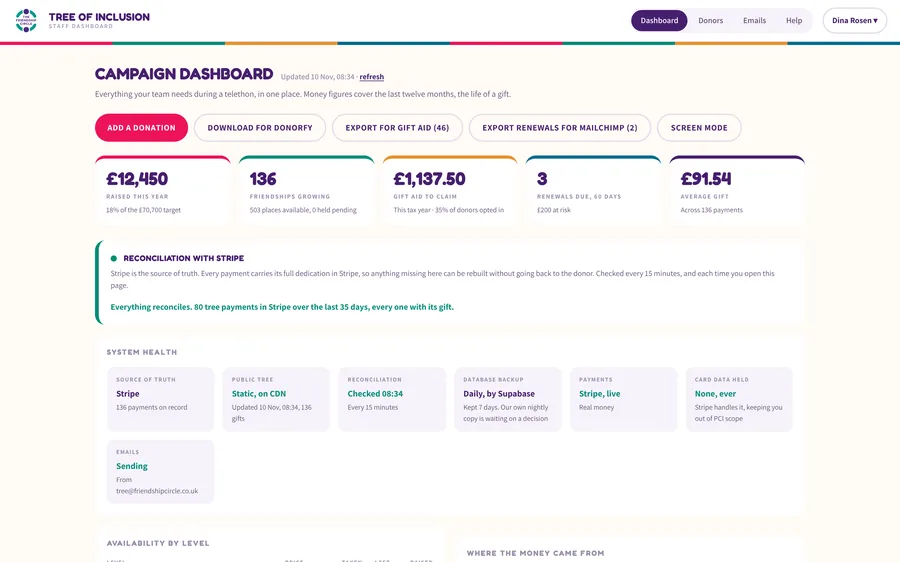
A second or two, with the donor's thank you already on its way.
From the brief to the result.
Where The Friendship Circle was when we met, what we built together, and what changed once it went live.
-
01 · The challenge
Where they were.
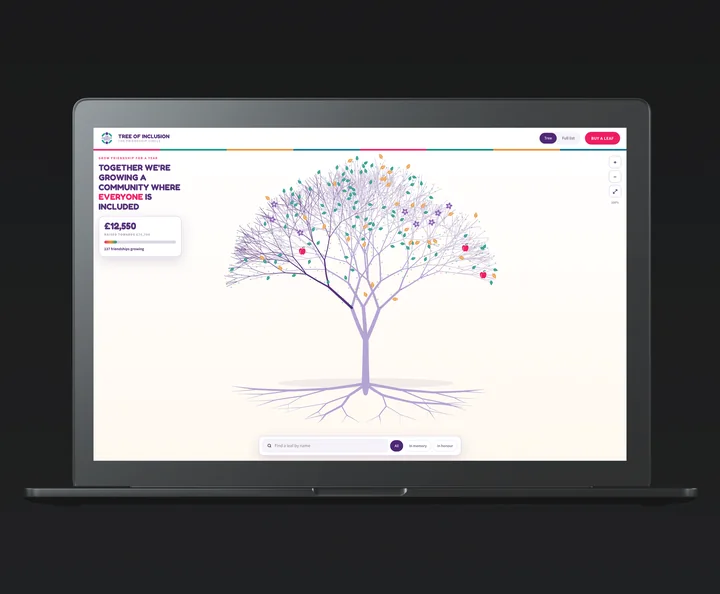
The Friendship Circle is a Salford charity that supports children and young people with additional needs, and their families, through friendship. They wanted a living tree for their year of fundraising, where every gift becomes a leaf carrying a dedication. Behind it they needed far more than a web page: card payments, gifts taken over the phone at a telethon, cheques and bank transfers, Gift Aid, yearly renewals and records that match their CRM, all run by a small team.
-
02 · Our solution
What we did.
We designed the tree and built the whole system behind it in code. Supporters choose a gift, write a dedication and pay by card, Apple Pay or Google Pay without leaving the page. Staff run the campaign from a secure dashboard: payment links for phone gifts, offline gifts, exports for Gift Aid, Mailchimp and Donorfy, and a check against Stripe every 15 minutes. The emails send themselves, from the charity's own mailbox.
-
03 · The results
What changed.
The tree went live on 5 November, in good time for the charity's public launch at the end of the month. A gift appears on the tree a second or two after payment, the donor gets a thank you with a link to their own leaf, and the team runs everything from one dashboard, with nothing retyped between Stripe, the tree and their CRM.
- 639places on one living tree
- 15minutes between checks against Stripe
- 7kinds of email the system sends
- 453automated tests before every release
How a gift becomes a leaf on the tree.
The tree is the part supporters see. Behind it, Stripe takes the payments, a database keeps the records and enforces the rules, and scheduled jobs check, send and tidy up on their own. Here's what happens when someone gives.
- 01 · On the tree
A supporter chooses a gift
They pick a leaf, blossom, apple or branch, add a dedication and Gift Aid, and pay by card, Apple Pay or Google Pay without leaving the page.
Five short steps - 02 · Stripe
The payment is confirmed
Stripe tells the system the moment the payment clears. The whole gift travels with the payment, so Stripe is the record everything is checked against.
Instant - 03 · The database
The gift is saved and shown
It's saved with its dedication, Gift Aid and twelve months to run, and the tree's public file is rewritten. No rebuild, nothing to approve.
A second or two - 04 · Everyone hears
The thank you goes out
The donor gets a thank you from the charity's own mailbox with a link to their leaf, and staff see the gift in the next morning's summary.
From the charity's mailbox
A dashboard for the whole campaign
Money raised, places left at each level, where gifts came from by channel and campaign, renewals due and business enquiries, all on one screen.
Gifts by phone, post and at events
Staff send a short payment link by email or text during a telethon, or record cheques, cash, bank transfers and charity vouchers. Card numbers are never typed in.
Two-step sign-in, enforced by the database
Staff sign in with a password and a code from an authenticator app, and the database itself refuses anyone without both.
Checked against Stripe every 15 minutes
Every payment carries the whole gift, so anything missing from the tree can be put back with one press, without going back to the donor.
Exports for Gift Aid, Mailchimp and Donorfy
One button makes an upload file for Donorfy, their CRM, in its own template, sending each payment once and never twice. Gift Aid and renewal lists come out ready to use.
A screen for reception
Screen mode shows the tree on a display and cycles through dedications, with no sign-in and nothing private on it.
What runs on its own.
The team shouldn't have to remember to send a receipt or check a payment went through. So the system does it: every email goes once, a failed one is retried, and an email problem never stops a payment or a gift.
- When a payment clears
The leaf goes on the tree
Stripe confirms the payment, the gift is saved and the tree's public file is rewritten. Nobody has to approve or publish anything.
- Straight after
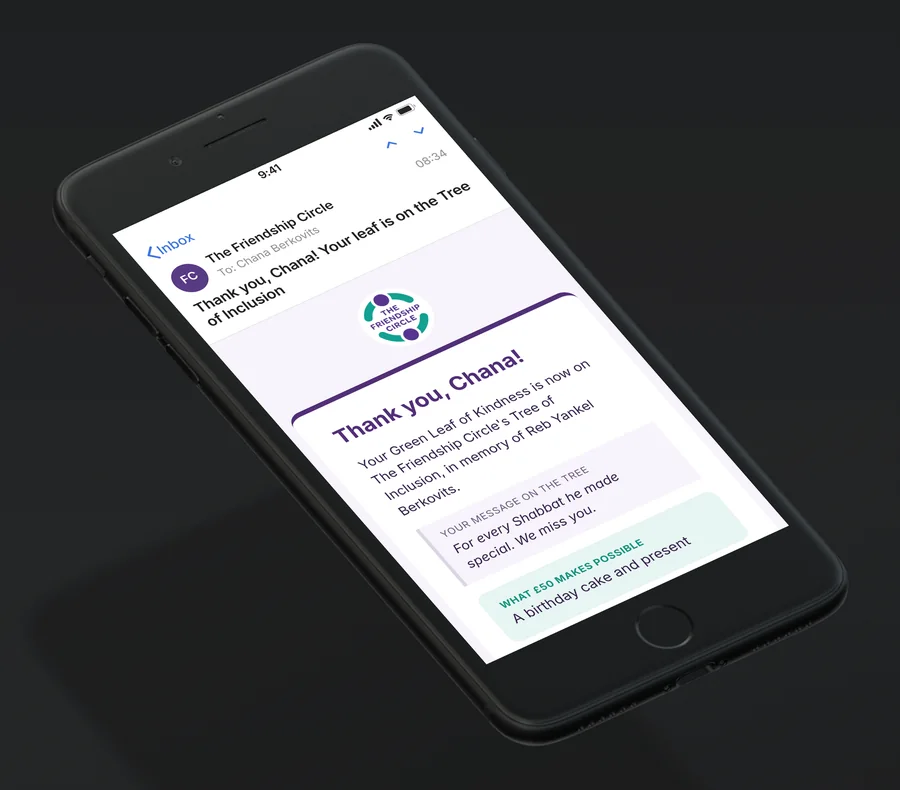
The donor's thank you
Sent from the charity's own Microsoft 365 mailbox, with their dedication, what their gift pays for, the Gift Aid it adds and a link to their leaf.
- When a business enquires
A reply, and an alert for staff
A business asking about a trunk or root place gets a reply straight away, and staff get an alert they can answer with Reply.
- Every morning
Yesterday's gifts, in one email
Staff get a summary of every new gift, with the total and where each one came from: the website, a payment link or offline.
- Every 15 minutes
Checked against Stripe
Every payment in Stripe is matched to a leaf. If one is still missing on the next check, staff get an email and put it right with one press. Any email that failed is tried again.
- Every day
Holds, renewals and lapses
An unpaid checkout lets its place go after 45 minutes, a telethon payment link holds its place for 26 hours, and a gift that isn't renewed after twelve months frees its place for someone new.
The thinking behind it.
A charity's fundraising doesn't happen on one page. Gifts come in online, over the phone on a telethon evening, by cheque at an event and by invoice from businesses, and every one needs a receipt, a Gift Aid record and a place in the CRM. So we started from the jobs the team actually does and built one system around them. Stripe holds the truth, the database enforces the rules (one gift per place, twelve months for everything, nothing private ever public), and the dashboard turns each job into a single button. The tree is what supporters see. Everything behind it is what lets a small team run a whole campaign.
- Tree Illustration & InteractionDesign
- Gift Flow & DedicationsDesign
- Public Tree & Full ListWebsite
- Stripe Checkout & Payment LinksWebsite
- Staff DashboardSystem
- Two-Step Staff Sign-inSystem
- Stripe ReconciliationSystem
- Gift Aid & Mailchimp ExportsSystem
- Donorfy CRM ExportSystem
- Screen Mode for ReceptionSystem
- Email Automation via Microsoft 365Automation
- Scheduled Checks & RenewalsAutomation
- Staff Guide & Privacy NoticeSupport
The system, up close.
Every screen is the real system, shown with made-up gifts so no supporter's details appear.
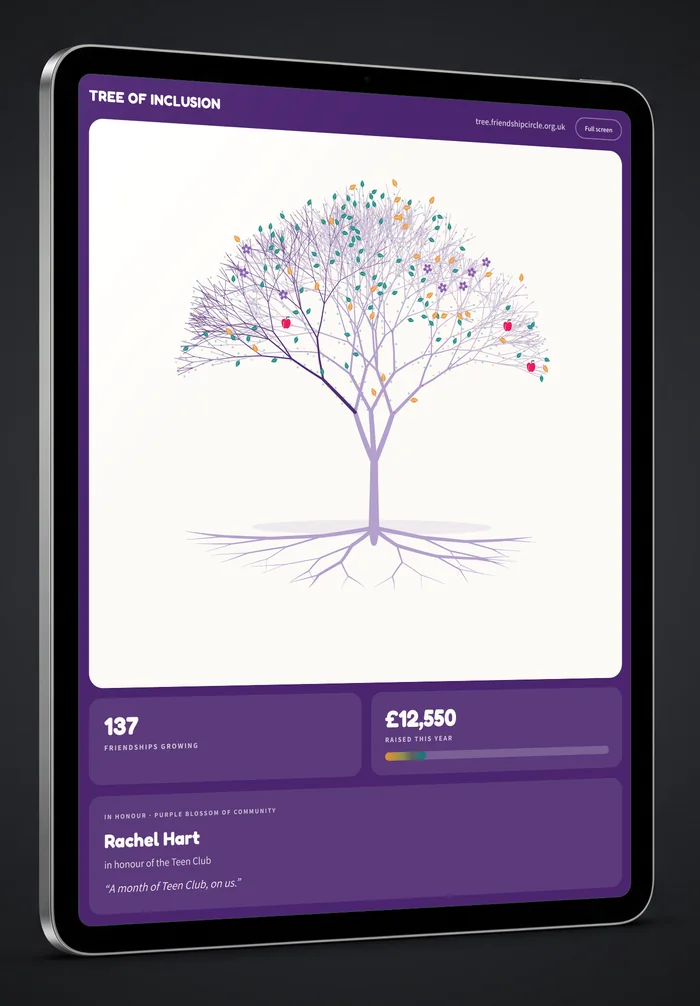
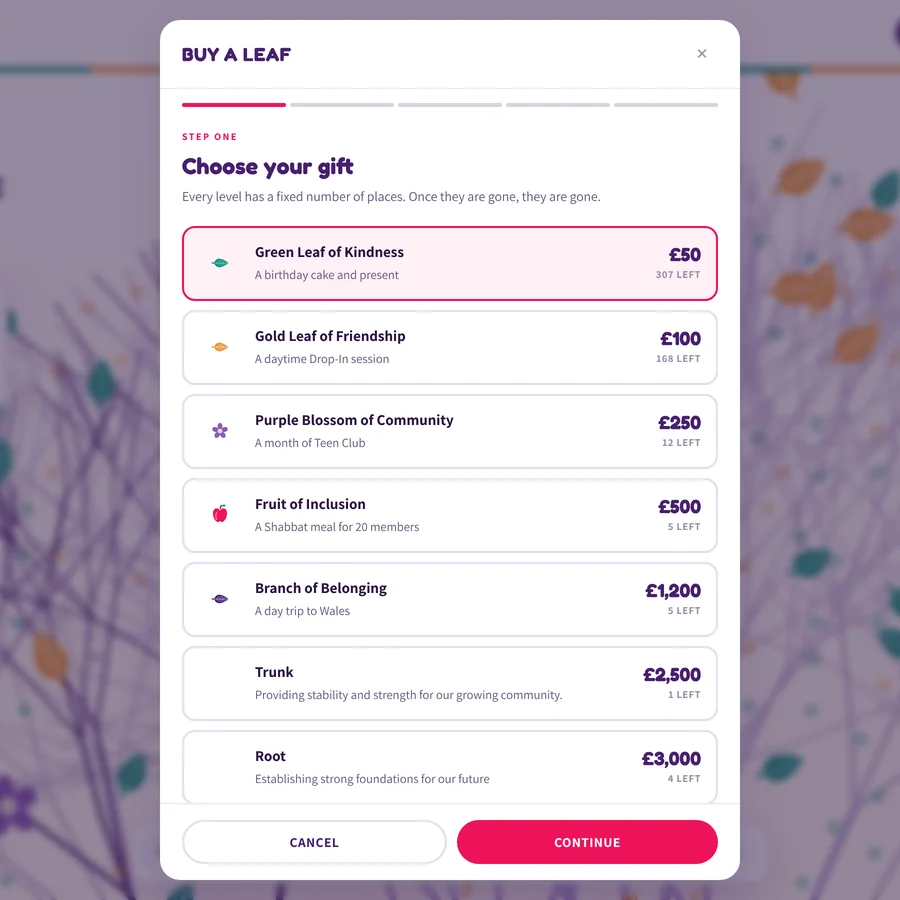
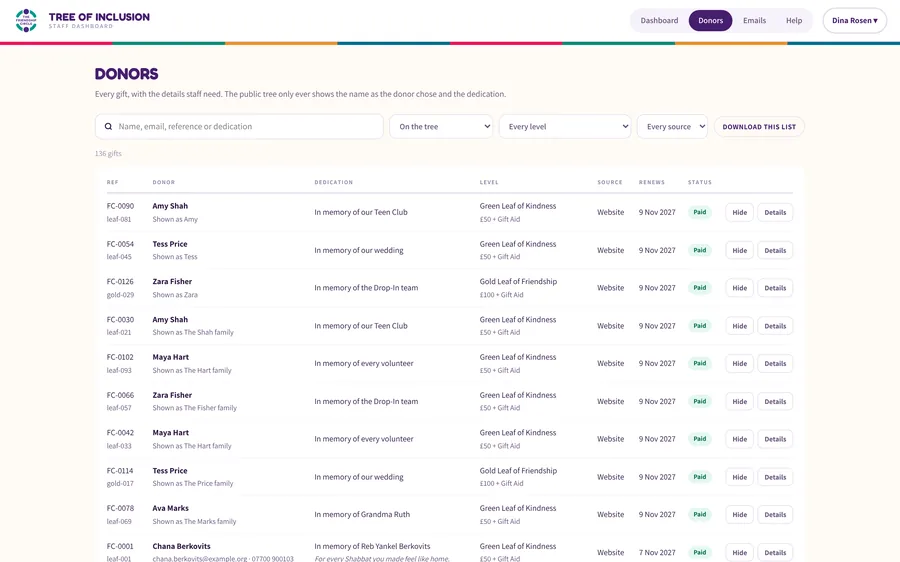
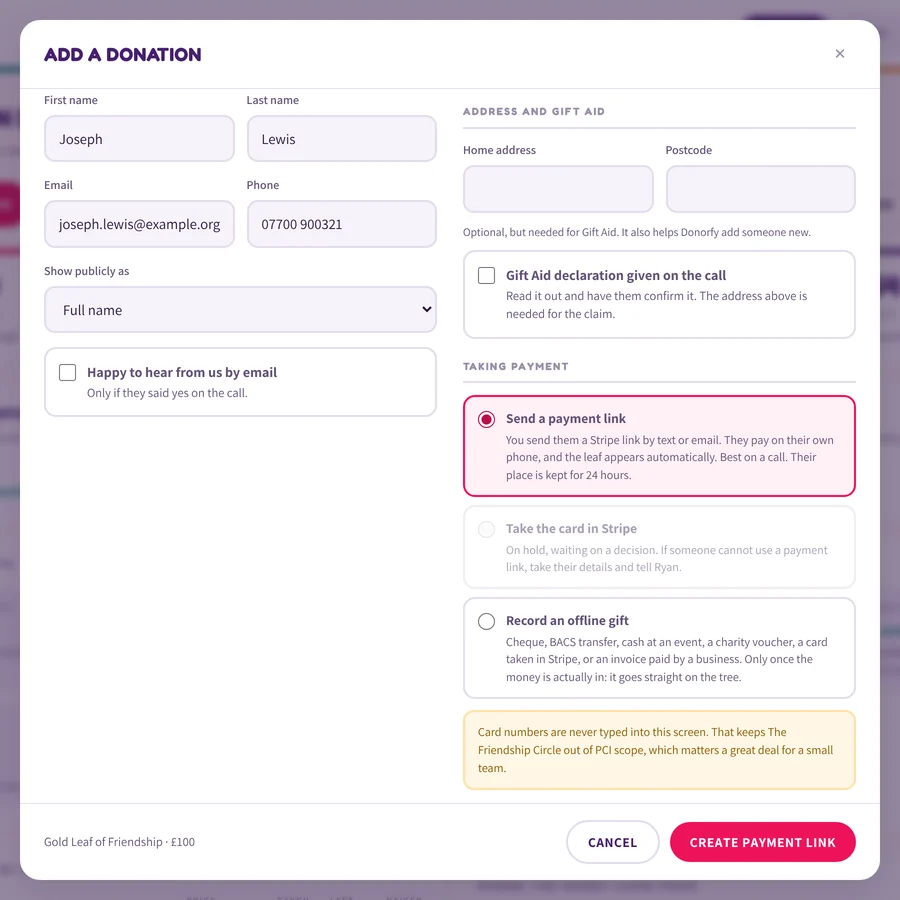
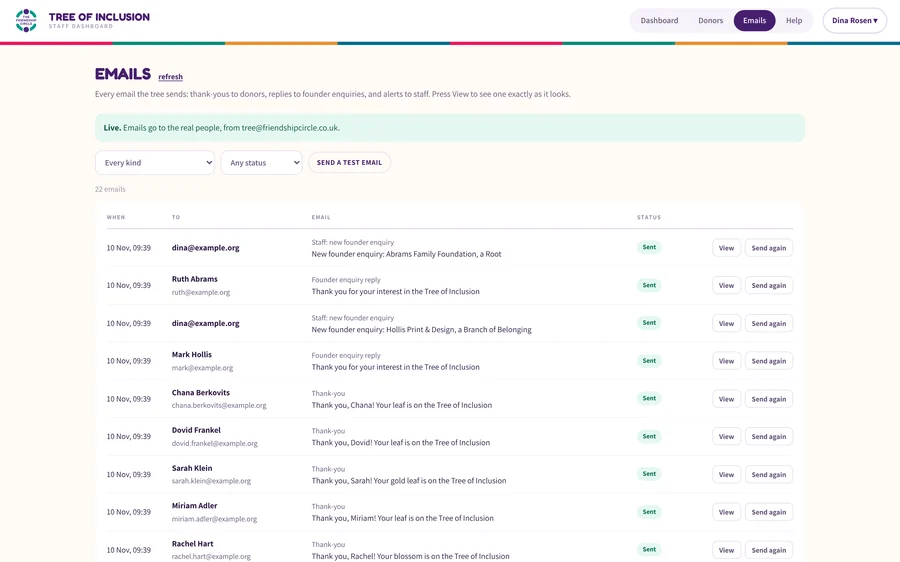
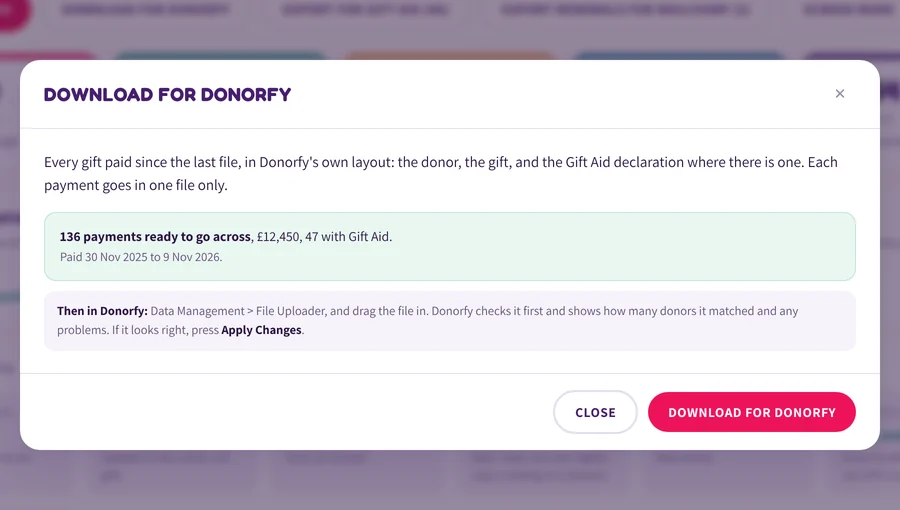
The tree is what supporters see. The system behind it is what lets a small team run a whole campaign, from a telethon evening to the Gift Aid claim.
Yes. The Tree of Inclusion belongs to The Friendship Circle, but the parts behind it are what we build for every kind of business: taking payments, staff dashboards, automatic emails, scheduled checks and exports to the tools you already use. We start from the jobs your team does every week and build around them.
Usually, yes. This system sends email through the charity's own Microsoft 365, takes payments with Stripe and makes files for Mailchimp and Donorfy. Most tools can be connected through their API or an import file, and we'll tell you on the first call which route suits yours.
Staff sign in with a password and a code from an authenticator app, and the database refuses anyone without both. Card details never reach the system, because Stripe handles them. The public page never reads the database, so it can't show anything private, and the database is hosted in London and backed up daily.
The system checks itself. Every 15 minutes it matches Stripe's payments against the tree, emails staff if something is still missing on the next check, and lets them fix it with one press. A failed email is tried again, and an email problem never stops a payment.
Yes. The dashboard has a Help area with step by step guides and pictures of the real screens, and it's updated with every release, so a new starter can take a donation over the phone on their first day.
Your supporters' or customers' data is always yours. Who owns the code is agreed in writing before any work starts, so there are no surprises later.
This one is built in code on Netlify, Supabase and Stripe. Many of the systems we build run alongside a Wix website, or on Wix Headless, where Wix runs your content, forms and contacts. We'll recommend whichever suits what you need.
It depends on what the system needs to do. After a short call about how you work now, we give you a fixed price and a timeline before any work starts.
Keep reading.
 Trent Estate Agents
Rented Template to Wix and Apex27 Platform
How Trent Estate Agents swapped an expiring, off-the-shelf portal template for a branded Wix website that takes its listings straight from Apex27.
Read the case study Kilmal
Trade Contractor to Commercial Specialist
How Kilmal bridged the gap between the perception of their brand, positioning them as commercial property specialists rather than just contractors.
Read the case study Ask Sonia
Amateur Site to International Authority
How Ask Sonia transformed from hours of manual admin and LinkedIn-dependent leads into an automated, internationally-reaching training business.
Read the case study Oedipus Private Ventures
Invested Properly From Day One
How Oedipus Private Ventures invested properly from day one, with a digital presence that matches a century-long track record.
Read the case study Ecogen Partners
From DIY Site to Market Leader
How Ecogen Partners evolved from a DIY website undermining their expertise into the market-leading position in renewable energy recruitment.
Read the case study Adamantine Recruitment
Basic to Brilliant New Age Recruitment
How Adamantine Recruitment transformed a DIY website into a modern, personality-driven platform that reflects their approach to tech and sales recruitment.
Read the case study Bespoke Foil Company
Franchise Foundations Ready to Scale
How Bespoke Foil Company transformed a scattered, product-heavy operation into a focused, scalable brand built for franchise growth.
Read the case study Tsala Trails
Misaligned Luxury to Premium Adventure
How Tsala Trails moved away from misaligned "luxury" positioning to find their true market as Southern Africa's premium walking safari specialists.
Read the case study
Tell us what you're planning. We'll take it from there.
Book a quick call, or send us your current website for a free video review: what's working, what isn't, and what we'd change. You'll get honest advice, a fixed price and a timeline. No hard sell.
Rather talk it through? Book a 15-minute call