Under the Bonnet is a new series where we take one part of a website we've built and show it working, starting with the Wix Headless CMS behind Trent Estate Agents. Each post explains what that part saves you, in plain English.
On most small business websites, adding a page means copying an old one, changing the words and checking it on a phone to make sure nothing's jumped about. It works, but it's the kind of job that gets put off for months, so the new service never quite makes it onto the site.
Every page is a row
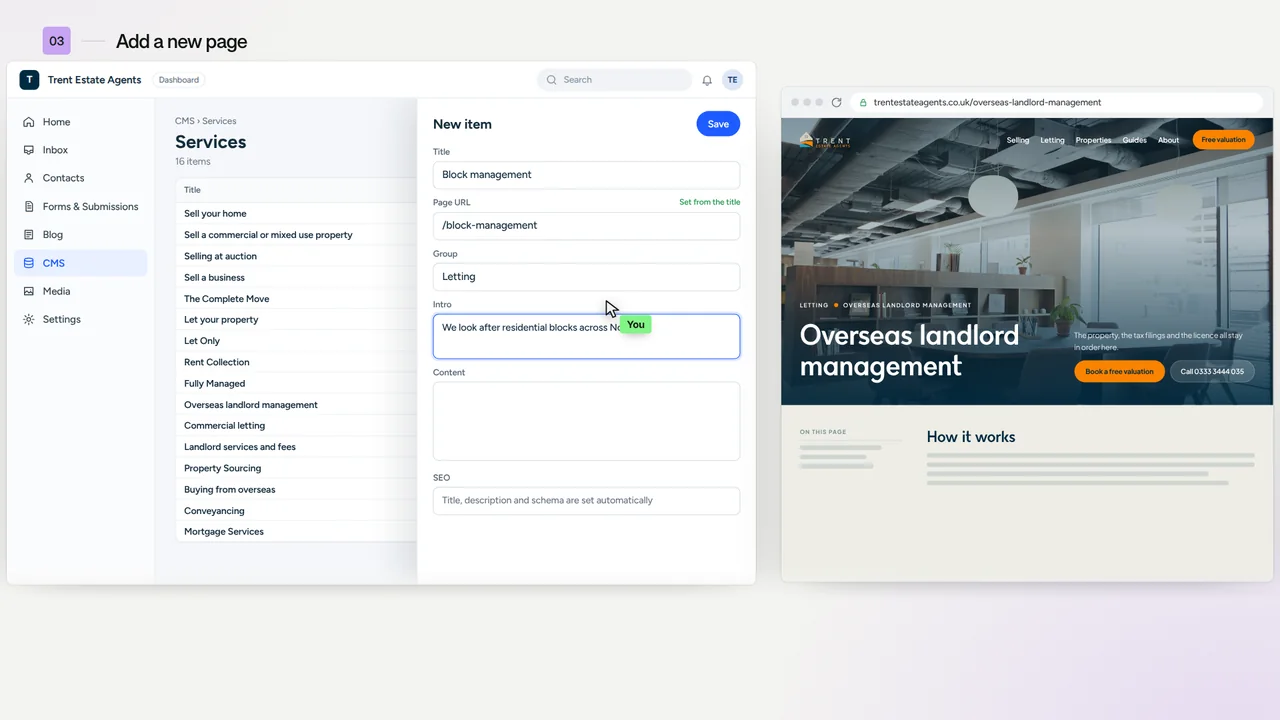
Trent's website is written in the CMS inside their Wix dashboard, the same dashboard they already log in to. All of their pages live in one collection called Pages, where each page is a row and each part of the page has its own column.
Change the introduction in a row, refresh the page, and the new words are there. Adding a page works the same way, it's just a new row.
Adding a page on a Wix Headless CMS
To add a page, say a new one for block management, Trent's team click Add Item and fill in five things: the title, the slug, the part of the site it sits in, the template and a short introduction. Then they press save, and that one row does five jobs at once.

- It gets its own web address from the slug, so block-management becomes trentestateagents.co.uk/block-management.
- It's fully designed, because the service template already knows what a service page looks like.
- It's filed under Letting, so it sits with the rest of the letting pages.
- It fits every screen, from a phone to a wide desktop, without anyone laying it out by hand.
- Google can tell what it is, because the schema that describes each page is built into the template.
The one thing a new row doesn't do is put itself in the menus. That's a row in Navigation items or Footer links, so Trent's team decide what goes where.
Adding a page shouldn't mean designing one. On Trent's site, it means filling in a row.
Why it matters more at eighteen pages than six
With six pages, copying one and changing the words works well enough. By eighteen, the copies have usually drifted apart, and a change to the design means eighteen separate edits with a decent chance that one gets missed.
On Trent's site, one template runs all eighteen service pages across selling, letting and sourcing, plus ten more pages such as the legal ones. A change to the design is made once and every page picks it up, and the next page takes a minute.
To be fair, Wix Studio's dynamic pages work on a similar idea, and for plenty of sites they're the right call. Headless earns its keep when the pages need a design of their own and the site has to stay quick as it grows, which is why we built Trent's on it.
Questions people ask about Wix Headless
Can I add new pages myself on a Wix Headless website?
Yes, as long as the site is built that way. On Trent's site you add a row to the Pages collection in the Wix dashboard, fill in the title, slug, template and content, and the template takes care of the design. Putting the page in the menu is one more row.
Do I need to know code to edit a Wix Headless website?
No. Everything you change day to day, like the words, pictures, pages and questions, lives in the CMS in your Wix dashboard. The code only changes when you want a new layout or feature, and that part's our job.
Does each new page get its own Google title and description?
Yes. Each row has an SEO title and an SEO description, which is what Google shows in its results, and the schema that tells Google what the page is about is built into the template.
Thinking about Wix Headless?
If adding a page to your website feels like a job for a rainy day, it's usually a sign the site has been copied together rather than built on templates. Send it over for a free website review and we'll tell you straight whether Wix Headless, Wix Studio or a tidy-up of what you've already got is the right move.
Next up: The enquiry form that files itself.